How to Play Mzansi Manager
You manage a football club for as many seasons as you like. You do not control players on the pitch. You pick the squad, set the tactics, work the transfer market and watch the results unfold. This guide walks through everything you need to start your first season.
1. Starting your career
Press Play Now, enter your manager name and choose a face (or go without one). Then pick one of the 100 clubs across five divisions, or design your own club with a custom badge and colours. New custom clubs always start in the bottom division, the Mzansi 5th Division. If you want a challenge, start at the bottom and work your way up. If you want to compete for trophies straight away, pick a Premier League club. Your first screen after confirming is your club dashboard.
2. The calendar
Time moves on a real calendar. The Continue button in the top bar fast-forwards day by day until something needs your attention, such as a match, and becomes Stop while it runs. On a match day it turns into Matchday. The Next day button in the bottom bar moves time forward a single day. The Calendar tab shows the whole month, your last three results, your next three fixtures and the transfer windows.
3. Matchday
Press Play matchday to watch your game live on a pitch. You can speed the match up, skip to the end, or turn off live mode in Tactics to simulate instantly. At half-time you can make up to five substitutions and change your approach. Results feed straight into the league table, and the game saves automatically after every matchday.
4. Squad and tactics
The Squad and Tactics screens show your line-up as player photos on the pitch, with the rating on the left, the position on the right and the captain marked underneath. In Squad, tap any player for a profile card with attributes, form, contract and stats. In Tactics, tap a starter and then a bench player to swap them, and choose a formation and style of play that suits the players you have. Fit, in-form players with the right ratings for their positions win matches, so check injuries and suspensions before each game.
5. Transfers and contracts
The transfer window is open for all of July and August and all of January, and the Transfers page always shows how many days are left. You can bid on listed players, sign free agents, sell players you no longer need and release others. Contracts run out, so renew your key players before they leave for nothing. Always keep your wage bill and transfer budget in balance. Spending more than the club can afford will upset the board.
6. The youth academy
Upgrading your academy is the cheapest way to build a strong team over time. Promising youngsters can be promoted into the senior squad, and the best of them grow into first-team starters or valuable sales.
7. Five divisions, promotion and relegation
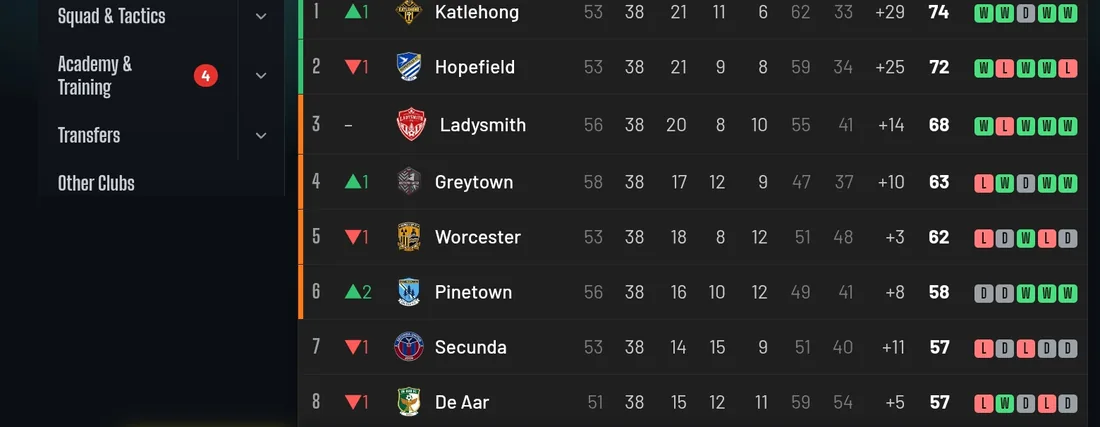
The pyramid runs: Mzansi Premier League, Mzansi Championship, Mzansi 3rd Division, Mzansi 4th Division and Mzansi 5th Division. Two clubs go up and two go down between divisions every season, and some divisions decide the last promotion place through playoffs. One tab holds the full league table, your own fixture list and every division's results by matchday.
8. Cups and African football
The Thatbank Cup is open to every club in the country. The top clubs also compete in the Mzansi8 and the Bayakhala Knockout, and the best qualify for the African Champions League against the strongest clubs on the continent. Your best South African players can also be called up for African Nations Cup qualifiers and finals, so expect to lose them for a while.
9. Finances, sponsors and reputation
The Club tab holds your badge, kit designs, sponsor deals and finances: budget, wage bill, income and spending, and your history season by season. Each summer you choose a sponsor, with some paying the full fee up front and others paying monthly. Your reputation grows when you finish well and win trophies, and bigger clubs will then offer you jobs. Finish badly and the board's patience runs out.
10. Saving your progress
The game saves itself after every matchday in your own browser, across three save slots. Because saves live in your browser, clearing your browser data will delete them, so avoid that on the device you play on.
Tips for your first season
- Check your squad for position gaps before the transfer window closes.
- Rotate tired players, because low stamina costs goals.
- Keep a transfer budget in reserve rather than spending everything in July.
- Promote a couple of academy players each season to keep wages low.
- Pay attention to the board's target and your reputation, not only the league table.
Get yourself added to the game
Want to see yourself in Mzansi Manager? Email mzansimanager@gmail.com with your name (it can be made up), age, city and country, your position or positions, which club in the game you would like to join and a link to your social media if you want people to follow you. If you send a photo, we use it to create your in-game face and delete it afterwards. Ratings are set by the Mzansi Manager team.
Works on phone and computer
Mzansi Manager runs in any modern browser. On a phone it plays best in landscape; if the layout looks cramped, open your browser menu and choose “Desktop site”, then rotate your phone.